LinkedIn prospecting tools: 7 options compared for 2026
Compare seven LinkedIn prospecting tools by job, operator work, and a 20-lead test that checks CRM handoff quality.
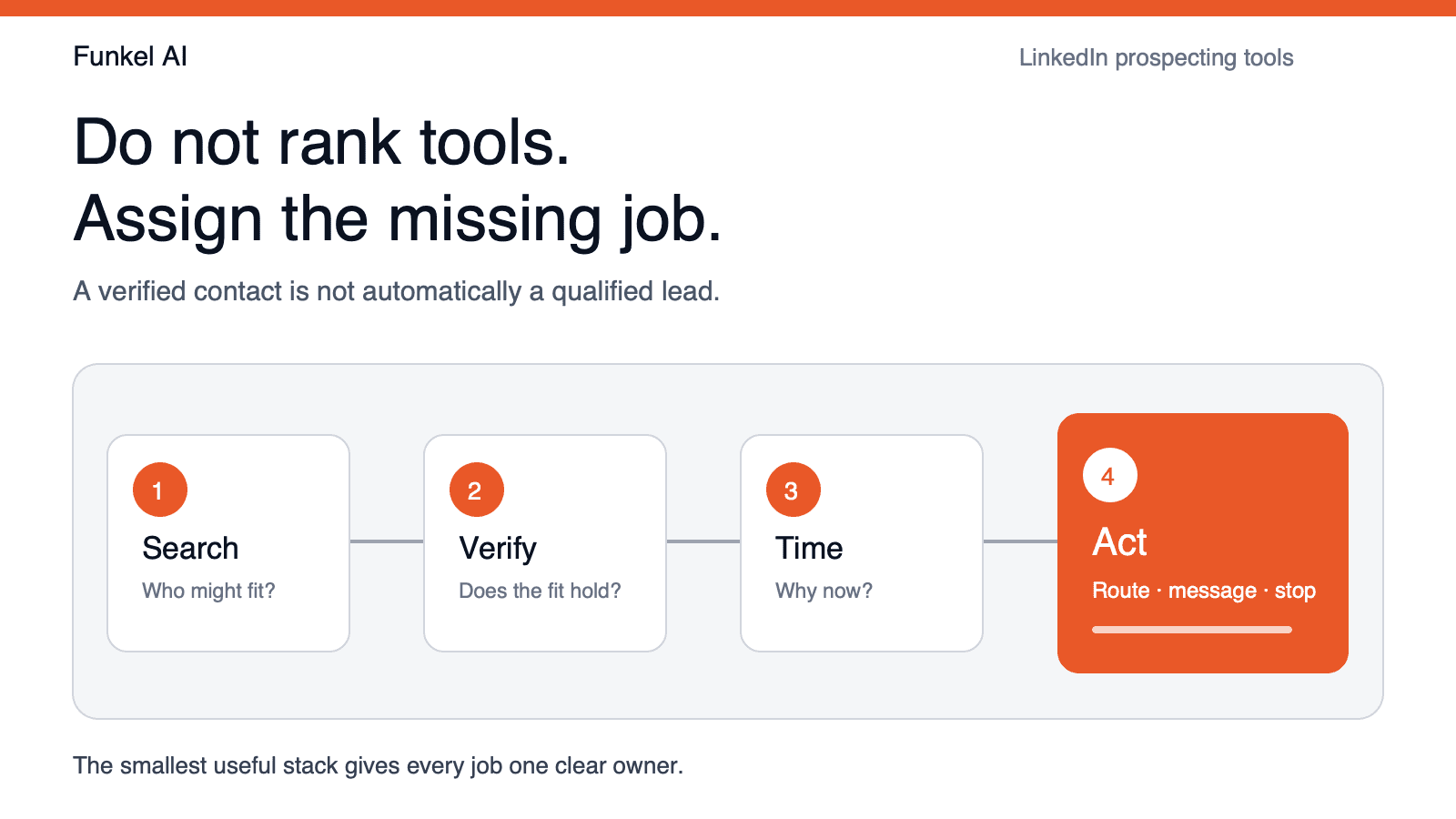
LinkedIn prospecting tools help B2B sellers find the right people, verify that they fit, notice when timing changes, and move each lead into a relevant next action. The best tool is not the one with the longest feature list. It is the one that owns the missing decision in your current workflow.
That distinction matters because “LinkedIn prospecting” hides several different jobs. Search tools build lists. Data tools verify contact details. Signal tools explain why a person may care now. Outreach tools run sequences. Buying one product for the wrong job creates another dashboard without fixing the bottleneck.
A public discussion in r/LinkedInTips captures the operator pain clearly: teams do not ask for one universal winner. They were comparing multi-account governance, multichannel coordination, extension overhead, credit creep, learning curves, and how much manual work remains. That is a better way to evaluate this category than ranking every product on volume alone.
The short answer: which LinkedIn prospecting tool is best?
- LinkedIn Sales Navigator: best for human-led account and contact research.
- Funkel AI: best for turning fresh buyer signals into reviewable outreach routes.
- Wiza: best for turning LinkedIn and Sales Navigator searches into verified contact data.
- Apollo: best for combining a large B2B database with sequencing.
- Clay: best for teams that want to build custom enrichment and research workflows.
- HeyReach: best for teams that need centralized, multi-account LinkedIn outreach.
- Dripify: best for a solo operator who wants a simpler LinkedIn sequence workflow.
Most founder-led teams need two layers, not seven: one research or data source and one system that owns priority and action. Start there.
Choose the tool by the job that is actually broken
The current search results mix contact databases, data extractors, enrichment builders, signal tools, and sequence platforms under one label. That makes a ranked list look simpler than the buying decision really is. Start with the output your team cannot produce reliably.
| If the bottleneck is... | The missing output | Start with this tool type | Do not buy it to solve... |
|---|---|---|---|
| Finding plausible people | A focused account and lead search | LinkedIn search or Sales Navigator | Qualification, messaging, or follow-up |
| Getting usable contact details | A verified email, phone number, or CRM record | A contact-data or extraction tool | Proving that the lead is worth contacting |
| Explaining why now | Fresh evidence, priority, and a proportional route | A buyer-signal workflow | Replacing a broad contact database |
| Combining many sources | A maintained enrichment and research pipeline | A flexible data-orchestration tool | Removing the need for an operator |
| Executing qualified outreach | Controlled sequences, follow-up, and reply stops | A LinkedIn or multichannel execution tool | Fixing a weak search or stale reason |
If the team cannot name one row, pause the purchase. Use the free LinkedIn prospecting checklist generator to turn the current process into inspectable steps before comparing subscriptions.
LinkedIn prospecting tools compared
| Tool | Best for | Primary job | Operator load | Main watchout |
|---|---|---|---|---|
| LinkedIn Sales Navigator | Hands-on LinkedIn research | Search and account context | High | Someone still has to qualify, route, and follow up |
| Funkel AI | Signal-led founder outbound | Timing, priority, and action | Low | Not a bulk contact database |
| Wiza | Contact exports from LinkedIn searches | Email and phone data | Medium | A verified contact is not the same as a qualified lead |
| Apollo | Database plus sequencing | Data and execution | Medium | Large lists can hide weak timing |
| Clay | Custom enrichment systems | Research and orchestration | High | Credits and workflow maintenance need an owner |
| HeyReach | Multi-account outreach operations | LinkedIn execution | Medium | Governance gets harder as sender count rises |
| Dripify | Simple solo LinkedIn sequences | LinkedIn execution | Low | Less useful when research and multichannel needs grow |
Product packaging changes. The capability and pricing pages linked below were reviewed on September 4, 2026; verify current terms before buying.
How we evaluated these tools
- Job ownership: does the tool own search, verification, timing, enrichment, or execution?
- Reason quality: can the seller explain why this person belongs in the queue?
- Operator load: how much research, cleanup, credit management, and maintenance remains?
- Handoff quality: does the reason survive from discovery into the message and follow-up?
- Workflow fit: does the product match a founder, a rep, an agency, or a scaled outbound team?
- Platform fit: can the workflow respect LinkedIn's current access rules and service limits?
We did not score products by the maximum number of actions they can automate. More automation is useful only after fit, timing, and stop conditions are clear. Read our guide to LinkedIn sales prospecting for the underlying workflow.
Public pricing and ownership snapshot
Entry price is useful only when it is paired with the work the tool leaves behind. These are the public starting points visible on each vendor's official site on September 4, 2026. Annual-billing amounts are labelled; promotions and enterprise quotes are excluded.
| Tool | Public entry point | What someone still has to own |
|---|---|---|
| LinkedIn Sales Navigator | Trial and demo offered; the reviewed page did not show a single public price | Search design, qualification, message route, and follow-up |
| Funkel AI | $99 per month; paid signup with money back if Funkel AI finds no qualified leads in 30 days | Buyer-profile review, signal choices, and approval of consequential actions |
| Wiza | Free plan; Email starts at $83 per user/month billed annually | Search quality, lead priority, and the reason for outreach |
| Apollo | Free plan; Basic starts at $49 per seat/month billed annually | List discipline, timing, exclusions, and sequence quality |
| Clay | Free plan; Launch starts at $167/month on annual billing, with separate actions and data credits | Table design, provider choices, credit budget, and failure handling |
| HeyReach | Growth starts at $79 per month per sender | Sender governance, campaign reason, pacing, and reply stops |
| Dripify | Basic starts at $39 per user/month billed annually | Lead quality, sequence logic, and expansion beyond a solo workflow |
A free plan does not make the surrounding work free. Record the time spent cleaning exports, checking false positives, rewriting openers, and reconciling replies. That operator cost often decides whether a lower subscription is actually the leaner stack.
Check LinkedIn's rules before you automate
A product's safety controls do not remove platform risk. LinkedIn's current User Agreement prohibits software that scrapes or copies the service. It also prohibits bypassing access controls or use limits. Review those rules before you connect a tool or increase activity.
Treat claims such as “safe automation” as vendor claims, not a guarantee from LinkedIn. Prefer visible sender limits, review controls, reply stops, and clear account ownership. Stop the workflow when its method or volume conflicts with LinkedIn's current rules.
1. LinkedIn Sales Navigator: best for hands-on research
Sales Navigator is the natural starting point when a founder or rep wants to explore accounts and people inside LinkedIn. Its filters, saved searches, lead lists, account lists, and relationship context support careful human research better than a generic contact export.
Its limitation is not data access; it is decision ownership. A saved lead still needs a qualification rule, a fresh reason, an outreach route, and follow-up memory. See the official Sales Navigator overview and our practical guide to building a better Sales Navigator list.
2. Funkel AI: best for signal-led founder outbound
Funkel AI is for a founder or lean team that knows who it wants to reach but cannot keep watching thousands of profiles for the few moments worth acting on. Paste the URL of what you are selling, review the generated buyer profile, choose signal sources, and review leads with the source, reason, score, and suggested route attached.
It is strongest when timing and follow-through are the bottleneck. It is not a replacement for a bulk contact warehouse. Funkel AI has public pricing at $99 per month and starts as a paid signup. You get your money back if Funkel AI finds no qualified leads in 30 days.
3. Wiza: best for contact data from LinkedIn searches
Wiza turns LinkedIn and Sales Navigator searches into contact lists with email and phone data. It fits teams that already know how to build a good LinkedIn search but lose time moving profiles into a usable outreach or CRM dataset.
The watchout is qualification. Verification can tell you whether an address is usable; it cannot tell you whether the person has a reason to care. Review Wiza's current workflow and plans on its official pricing page.
4. Apollo: best for database plus sequencing
Apollo combines a large B2B database, filtering, enrichment, and outbound execution. It is a practical consolidation choice when a small team wants one place to source contacts and run email or sales sequences.
Consolidation does not solve timing by itself. If every matching title enters the same sequence, the result is still a cold list. Use Apollo when data and execution are the missing layers, then add a clear reason gate. Its current tiers are published on the official Apollo pricing page.
5. Clay: best for custom enrichment workflows
Clay is the builder's option. It can combine data providers, enrich rows, research accounts with AI, monitor signals, and route results into a custom GTM workflow. That makes it useful when a team has a specific data model that packaged tools cannot express.
Flexibility creates an operator role. Someone must own the table design, credit budget, failure handling, and maintenance. If nobody owns those details, a clever enrichment workflow becomes another manual system. Review current packaging on the official Clay pricing page.
6. HeyReach: best for multi-account LinkedIn outreach
HeyReach is designed around centralized LinkedIn outreach across multiple sender accounts. It fits agencies, GTM teams, and outbound operations where account rotation, shared campaign management, and integrations matter more than single-user simplicity.
Multi-account scale raises the cost of governance. Teams need clear ownership, sender-level pacing, reply stops, and a reason for every sequence. The public operator discussion cited above praised the centralized workflow while warning that account management becomes complex. See the official HeyReach pricing page.
7. Dripify: best for a simple solo workflow
Dripify is the simpler execution option in this list. Its appeal is a lower operational burden for a solo founder, recruiter, or individual seller who wants to organize LinkedIn actions and sequences without building a custom system.
Simplicity becomes a constraint when the team needs deep enrichment, multiple data sources, complex multichannel routing, or centralized account governance. Check the current plans on the official Dripify pricing page.
How to choose in five steps
- Name the missing job. Is your bottleneck search, verification, timing, enrichment, or execution?
- Audit 20 real leads. Track the minutes spent finding, checking, prioritizing, and routing each one.
- Choose one system of decision. Decide where lead priority and the reason for it will live.
- Run the same 20-lead test. Compare false positives, missing context, time saved, and message quality.
- Remove a step or tool. A new platform should replace manual work or redundant software.
The test should end with messages, not exports. If a tool produces 20 contacts but leaves you researching every opener from scratch, it has moved the bottleneck rather than removed it.
Copy this 20-lead prospecting tool scorecard
Run the same 20-lead sample through every shortlisted tool. Keep the buyer profile, target roles, geography, and review standard fixed. This turns a feature comparison into an acceptance test.
| Measure | Record | Why it matters |
|---|---|---|
| Plausible people | Count out of 20 | Shows whether search finds the intended role and company |
| Verified identities | Count with confirmed role, company, and profile | Separates data coverage from correct identity |
| Accepted leads | Count that passes fit, evidence, and timing review | Measures usable output instead of list size |
| Supported routes | Count with an eligible channel and connected sender | Prevents a source record from becoming an unsupported action |
| Duplicate or unusable records | Count and reason | Exposes cleanup work hidden by export totals |
| Unsupported claims | Count in research notes or message drafts | Tests whether AI output stays tied to evidence |
| Operator time | Minutes from search to accepted next action | Shows whether the tool removes work or moves it |
| Reply-stop test | Pass or fail after a test reply | Checks that later actions stop when a conversation starts |
Calculate cost per accepted lead as tool allocation, data spend, and valued operator time divided by accepted leads. Keep the operator-time value separate when you do not have an agreed hourly cost. Do not use cost per exported contact as the decision metric.
Run the same small batch through the free buyer-intent signal prioritizer when timing is the suspected gap. It forces the evidence, freshness, fit, and next action to stay visible instead of collapsing the decision into one unexplained score.
Test the CRM handoff before you buy another tool
Some LinkedIn prospecting tools promise a faster path into a CRM. That helps only when the CRM record tells the next owner why the person was accepted and what should happen next. Add this handoff check to the same 20-lead test; do not judge it from a demo export.
- Keep identity together. Match the person to the correct company and LinkedIn profile. Re-import one lead and check that the tool updates the existing record instead of creating a second person.
- Keep the reason together. Record the source, observation date, exact evidence, buyer fit, owner, and one next action. A label such as “high intent” does not tell a rep what the buyer did.
- Keep the stop together. Mark one test lead as replied and another as opted out. Confirm that later outreach stops in the sending workflow and that the CRM shows the state.
For example, a verified sales leader who posted a specific hiring question may pass the identity and evidence checks. A second sales leader with only a matching title may belong on a watch list. The CRM must preserve that difference. If both records enter the same sequence, the integration moved data but lost the decision.
Count complete handoffs out of accepted leads, duplicate records, and minutes spent fixing missing context. Then compare those counts with the current manual process. Our outbound sales automation guide explains how the same reason should survive through follow-up.
A lean LinkedIn prospecting stack for founders
The minimum stack is not a fixed pair of brand names. It is a short ownership contract. Every lead should carry four answers from search to reply:
| Job | Required answer | Failure signal |
|---|---|---|
| Search | Where did this plausible account and person come from? | The team cannot reproduce the list or explain exclusions |
| Verify | What proves the person, company, and buying role fit? | A valid email is treated as qualification |
| Time | What fresh change makes this worth attention now? | Every matching title receives the same priority |
| Act | Who owns the route, message, follow-up, and stop condition? | The reason disappears after export or a reply does not stop automation |
Give each job one owner. Sales Navigator plus a spreadsheet can work when volume is low and the founder owns every decision. A data tool plus a signal-led workflow can work when sourcing and prioritization are the bottlenecks. The failure mode is letting four products score the same lead while none preserves the reason into the reply.
FAQ
What is a LinkedIn prospecting tool?
A LinkedIn prospecting tool helps B2B sellers find, research, prioritize, enrich, or contact potential buyers using LinkedIn data and workflows. Some tools focus on search, some on contact data, some on buyer signals, and others on outreach execution.
What is the best LinkedIn prospecting tool for founders?
The best founder tool depends on the missing job. Use Sales Navigator for hands-on research, Wiza for contact verification, Funkel AI for signal-led prioritization, Apollo for database plus sequencing, Clay for custom enrichment, and a dedicated execution tool only when sequence operations are the real bottleneck.
Do I need Sales Navigator to prospect on LinkedIn?
No. Founders can prospect with standard LinkedIn search, public posts, company pages, and saved manual research. Sales Navigator becomes useful when advanced filtering, lead lists, account lists, and ongoing research save enough time to justify the additional tool.
How many LinkedIn prospecting tools should a small team use?
Usually one primary workflow and one complementary research or data layer. If several products enrich, score, and sequence the same lead, the team has not defined ownership. Start with search, verification, timing, and action, then choose the smallest stack that covers them.
How do I choose between LinkedIn data extraction and outreach automation?
Choose data extraction when your team already knows which searches are useful but loses time finding usable contact details. Choose outreach automation when qualified leads already exist and the bottleneck is routing, pacing, follow-up, or reply stops. If qualification is still weak, fix that before adding either layer.
What is the minimum LinkedIn prospecting stack?
The minimum stack has one source of plausible people and one place that owns qualification, timing, next action, and stop conditions. For a founder, that can be LinkedIn search plus a disciplined spreadsheet. Add another product only when a measured bottleneck justifies it.
How do you compare LinkedIn prospecting tools?
Run the same 20-lead sample through each tool. Count plausible people, verified identities, accepted leads, supported routes, duplicates, unsupported claims, operator minutes, and whether a reply stops later actions. Compare cost per accepted lead, not cost per exported contact.
What should a LinkedIn prospecting tool send to a CRM?
Send an accepted person and company, the source and date of the evidence, the owner, one next action, and the reason for that action. Test duplicate handling and confirm that a reply or opt-out stops later outreach. A contact record alone is not a complete handoff.
Are LinkedIn prospecting tools safe to use?
No LinkedIn prospecting tool is risk-free. LinkedIn prohibits scraping or copying its services with software and bypassing access controls or use limits. Review the current User Agreement, use connected accounts carefully, set conservative limits, and stop any workflow that conflicts with platform rules.
Read next
- What is B2B intent data? Types, examples, and a quality testLearn what B2B intent data is, compare its sources, and test whether each signal supports a real sales action.
- Outbound sales automation tools in 2026: 6 compared by intent signalsCompare six outbound sales automation tools by intent evidence, route control, CRM handoff, cross-channel stops, and complete cost.
- How to use LinkedIn for sales prospecting: 7 stepsUse standard LinkedIn people search to test a buyer pool, then follow a 7-step prospecting workflow and audit 20 profiles before outreach.