B2B sales intelligence tools: 7 options for small teams in 2026
Compare seven B2B sales intelligence tools by job, pricing visibility, operator load, and accepted-lead quality.
Sales intelligence tools help B2B teams decide which accounts and people to pursue, why they may be worth contacting, and what to do next. The category includes contact databases, LinkedIn research tools, enrichment systems, account-intent platforms, and signal-led outreach products. The best choice depends on the job your current stack fails to do.
That last sentence is the important one. Small teams rarely suffer from having no data. They suffer from stitching together Sales Navigator, spreadsheets, enrichment credits, manual research, and an outreach tool without deciding which system owns qualification. A recent small-team discussion in r/SalesOperations framed the problem exactly that way: the team was piecing together LinkedIn data and manual research and wanted to reduce lead qualification work.
The short answer: which sales intelligence tool is best?
There is no universal best sales intelligence tool. For a small B2B team, the right shortlist usually looks like this:
- Funkel AI: best for turning fresh buyer signals into reviewable outbound routes.
- LinkedIn Sales Navigator: best for human-led LinkedIn account and contact research.
- Apollo: best for combining a large contact database with outbound execution.
- Clay: best for flexible enrichment and custom GTM data workflows.
- Cognism: best for teams that prioritize compliance-focused contact data, especially in EMEA.
- ZoomInfo: best for established teams that need broad company, contact, and intent data.
- 6sense: best for larger account-based teams that need account intent and buying-group context.
Do not buy all seven. Pick the layer that removes the most expensive manual decision in your workflow, then make every other tool feed or follow that decision.
Sales intelligence tools compared
| Tool | Best for | Primary layer | Pricing visibility | Main watchout |
|---|---|---|---|---|
| Funkel AI | Lean, signal-led outbound | Timing and action | Public: $99/month | Not a replacement for an enterprise contact-data warehouse |
| LinkedIn Sales Navigator | LinkedIn research and saved-account monitoring | Discovery and relationship context | Trial and demo offered; no single price appeared on the reviewed page | Still needs a qualification and outreach workflow |
| Apollo | Database plus sequencing in one platform | Contact data and execution | Free plan; Basic is $49 per seat/month, billed annually | More records do not automatically create better timing |
| Clay | Custom enrichment and data orchestration | Enrichment and workflow building | Free plan; Launch displayed at $167/month on annual billing | Powerful workflows require an operator and clear cost controls |
| Cognism | Compliance-focused B2B contact data | Contact data | Standard and Pro packages; request a custom quote | Entry cost may be high for a very small team |
| ZoomInfo | Broad enterprise GTM intelligence | Company, contact, and intent data | Free trial offered; request package pricing | Scope and contract may exceed a founder-led team's needs |
| 6sense | Account-based sales and marketing teams | Account intent and buying groups | Contact sales | Works best with enough traffic, accounts, and RevOps maturity |
Pricing and packaging change. The labels above reflect vendor pages reviewed on September 7, 2026; verify current terms before buying.
How we evaluated these B2B sales intelligence tools
Most comparison pages mix fundamentally different products and rank them as if they do the same job. We used five criteria that matter to a lean outbound team:
- Job ownership: which decision does the product own: fit, data, timing, or action?
- Time to value: can a founder or small sales team get a useful result without a long implementation?
- Operator load: how much manual research, workflow design, and data cleanup remains?
- Pricing clarity: can a team estimate cost before a sales conversation?
- Handoff quality: does the reason a lead was selected survive into the message and follow-up?
The fifth criterion is often missed. A database can tell you who matches a filter. A useful sales intelligence workflow should also preserve why the lead deserves action now. That is the bridge between our guides to buyer intent signals and outbound sales automation.
1. Funkel AI: best for signal-led outbound
Funkel AI is built for teams that already understand their market but struggle to find the small set of prospects with a reason to care now. You paste your product URL, review the generated buyer profile, choose signal sources, and review leads with the source, reason, score, and suggested outreach route attached.
It is a strong fit when your bottleneck is timing and follow-through, not access to another giant list. It is not the right choice if you only want bulk contact exports or a company-wide data warehouse. Funkel AI has public pricing at $99 per month and starts as a paid signup. You get your money back if Funkel AI finds no qualified leads in 30 days.
2. LinkedIn Sales Navigator: best for human-led LinkedIn research
LinkedIn Sales Navigator is strongest when a seller wants to explore accounts, people, relationships, role changes, and saved searches inside LinkedIn. Its real advantage is not simply the number of filters. It is the context sellers can inspect before deciding whether an account belongs on the list.
The tradeoff is operator time. Sales Navigator helps you discover and monitor. It does not decide which signal wins, write the routing rule, or preserve the reason through follow-up. Our Sales Navigator prospecting guide shows how to add that missing layer. Review current editions on the official Sales Navigator page.
3. Apollo: best for database plus sequencing
Apollo combines prospect data, filtering, enrichment, and outbound execution. That makes it attractive to small teams that want fewer vendors and one place to build a list and run a sequence. Its pricing page shows public free and paid tiers, so teams can compare entry cost without waiting for a quote.
Apollo is less differentiated when your hardest problem is deciding why this prospect should receive this message today. A large database can reduce sourcing work while still producing a cold list. Choose it when consolidation matters; add a signal and qualification layer when timing matters.
4. Clay: best for enrichment and custom GTM workflows
Clay is the flexible option. It can combine providers, enrich rows, research accounts with AI, watch signals, and route data into a custom GTM workflow. Its current product and pricing page describes enrichment, signals, sequencing, and usage-based plans.
That flexibility is both the strength and the cost. Clay is best when someone owns the data model, credit budget, error handling, and workflow maintenance. If nobody has that role, a clever table can become another manual system the founder has to babysit.
5. Cognism: best for compliance-focused contact data
Cognism focuses on B2B contact data, phone-verified records, enrichment, and compliance-conscious prospecting. It is especially relevant to teams selling in EMEA or teams where reliable phone data is central to the motion. The official pricing page describes Standard and Pro packages with five included seats and a credit model. It requires a custom quote.
The tradeoff for a tiny team is commitment. If your problem is not contact accuracy at scale, the entry cost may solve the wrong layer. Validate your ICP and channel first, then invest in premium data when the economics are clear.
6. ZoomInfo: best for broad enterprise GTM intelligence
ZoomInfo spans company and contact data, intent, engagement, and GTM workflows. It fits established sales organizations that need broad coverage, integrations, governance, and multiple data use cases. Its pricing page describes flexible packages but routes buyers through sales for a quote.
For a founder-led team, breadth can become overhead. Before buying, define the weekly decision ZoomInfo will improve and the person who will operationalize its data. If the answer is merely “build a bigger list,” start smaller.
7. 6sense: best for account-based intent and buying groups
6sense is designed for account-based organizations that want to rank accounts, reveal likely buying-group members, and activate account context across seller workflows. The official sales intelligence page emphasizes account likelihood, buying groups, and guidance for what sellers should say.
It is strongest when marketing, sales, CRM, and RevOps already operate around a meaningful account universe. A very small team with limited traffic and no account-based process may not have enough signal or operational capacity to justify the system.
How to choose a sales intelligence tool in five steps
- Name the missing decision. Is the bottleneck finding contacts, verifying data, spotting timing, or choosing the next action?
- Measure the manual cost. Track one week of research, cleanup, qualification, and handoff time.
- Choose one system of decision. Decide where lead priority and its reason live.
- Run a 20-lead test. Compare accuracy, useful context, time saved, and message quality before scaling.
- Remove a tool if you add one. A new platform should replace manual work or redundant software, not simply add another tab.
The 20-lead test matters more than a polished demo. Take the same ICP and ask each shortlisted product to produce the leads your team would actually contact. Then inspect false positives, missing context, reason freshness, and whether the output survives into the next message.
Run a 20-lead acceptance test
Export count is not a quality measure. Test 20 consecutive results from one buyer profile and declare the job each product must perform. Score only the fields that the product promises, then record the work needed before a seller can act.
record_id:
declared_job:
source_url:
entity_correct: yes | no
account_fit: yes | no
person_fit: yes | no
promised_evidence_present: yes | no
handoff_complete: yes | no
supported_route:
manual_repair_minutes:
accepted: yes | no
rejection_reason:
Use a mixed batch. Include five clear fits, five weak fits, five stale or ambiguous records, and five records that should be rejected. This prevents a vendor demo from testing only easy matches.
| Measure | Calculation | What it reveals |
|---|---|---|
| Acceptance rate | Accepted records ÷ 20 | How much output is ready for the declared next step |
| False-positive rate | Wrongly accepted records ÷ accepted records | How often clean data hides a bad sales decision |
| Repair load | Total manual repair minutes ÷ 20 | How much operator work remains after the tool finishes |
| Cost per accepted lead | Total test cost ÷ accepted records | Whether a cheaper export creates a more expensive workflow |
A contact-data tool can pass without supplying timing evidence when timing is outside its declared job. It fails when the identity, fit, or promised contact method is wrong. A signal product must also keep the source, date, and supported route visible. This keeps category differences honest while every vendor faces the same acceptance gate.
A lean sales intelligence stack for founders
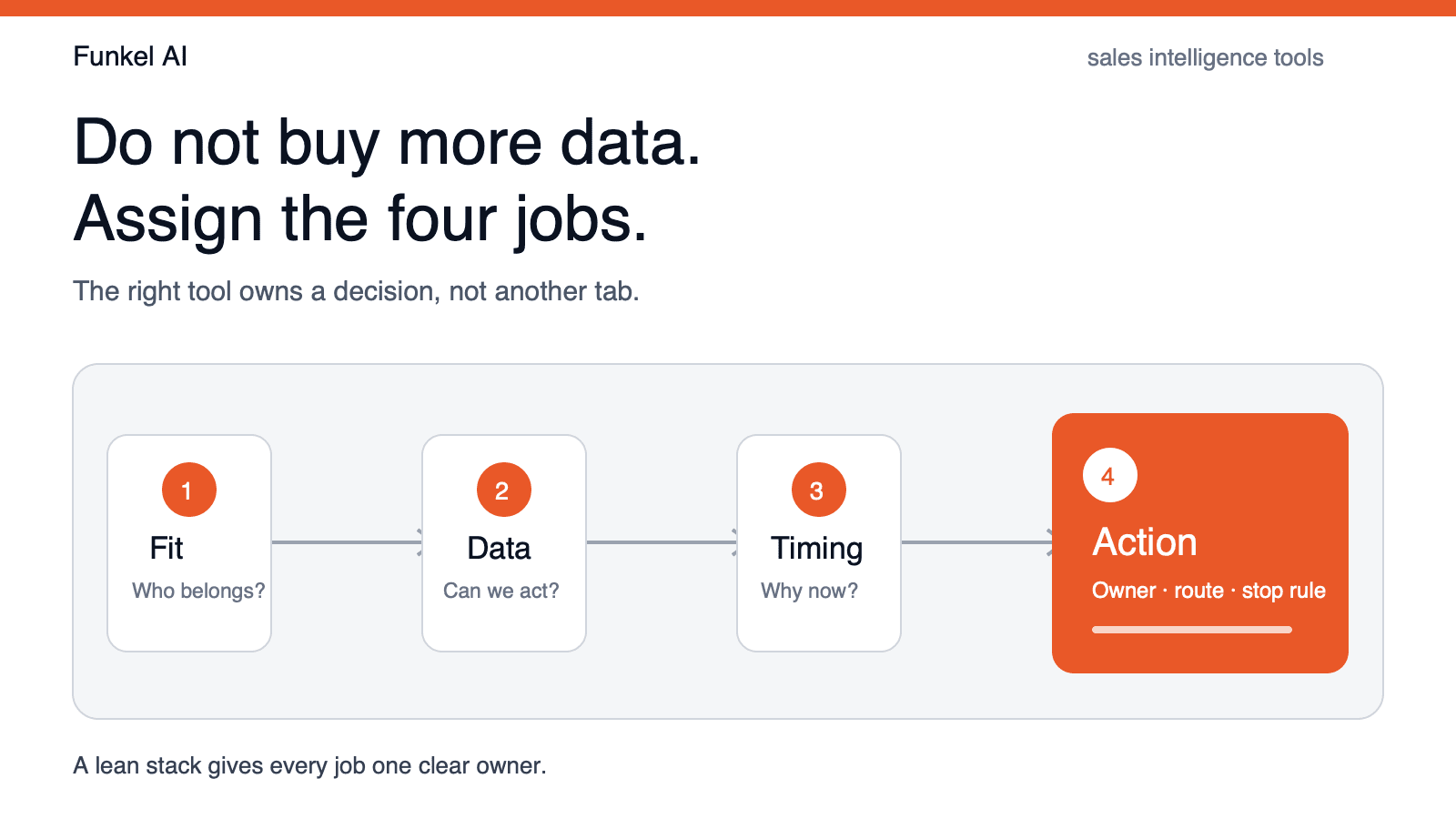
A small team does not need a miniature enterprise stack. It needs four owned jobs:
- Fit: a clear buyer profile and disqualification rules.
- Data: enough reliable account and contact information to act.
- Timing: a fresh reason this account may care now.
- Action: an owner, channel, message route, and stop condition.
One product can own multiple jobs, but every job needs one clear owner. That is how you avoid the classic failure: Sales Navigator finds the account, an enrichment tool fills the row, a sequencer sends the message, and nobody remembers why the lead was selected.
FAQ
What are sales intelligence tools?
Sales intelligence tools collect and organize information that helps B2B teams identify, understand, prioritize, and contact prospects. Depending on the product, that information may include company data, contacts, buying signals, relationship context, enrichment, lead scores, or recommended next actions.
What is the difference between sales intelligence and a CRM?
Sales intelligence helps decide who to pursue and why. A CRM records the relationship, activity, pipeline stage, and ownership after a prospect enters the sales process. Many tools integrate the two, but they solve different primary jobs.
What is the best sales intelligence tool for a startup?
The best startup tool is the one that removes the startup's largest manual bottleneck. Use Sales Navigator for human-led LinkedIn research, Apollo for database plus sequencing, Clay for custom enrichment, Funkel AI for signal-led prioritization and outreach, and enterprise platforms only when the data and process maturity justify them.
How many sales intelligence tools does a small team need?
Usually one primary system and, at most, one complementary data or research layer. If three tools all score or enrich the same lead, the team has not defined ownership. Start with fit, data, timing, and action, then choose the smallest stack that covers those jobs.
How do you evaluate sales intelligence software?
Test 20 consecutive records from one buyer profile. Check entity accuracy, account fit, person fit, promised evidence, and handoff completeness. Record accepted leads, false positives, missing fields, manual repair time, and total test cost before comparing vendors.
What is the difference between sales intelligence and sales engagement?
Sales intelligence helps a team decide who matters, what evidence supports the decision, and why timing may matter. Sales engagement helps execute calls, emails, social steps, and follow-up. One product can cover both jobs, but the decision and execution layers remain distinct.
Read next
- What is B2B intent data? Types, examples, and a quality testLearn what B2B intent data is, compare its sources, and test whether each signal supports a real sales action.
- Outbound sales automation tools in 2026: 6 compared by intent signalsCompare six outbound sales automation tools by intent evidence, route control, CRM handoff, cross-channel stops, and complete cost.
- How to use LinkedIn for sales prospecting: 7 stepsUse standard LinkedIn people search to test a buyer pool, then follow a 7-step prospecting workflow and audit 20 profiles before outreach.