How to use LinkedIn for sales prospecting: 7 steps
Use standard LinkedIn people search to test a buyer pool, then follow a 7-step prospecting workflow and audit 20 profiles before outreach.
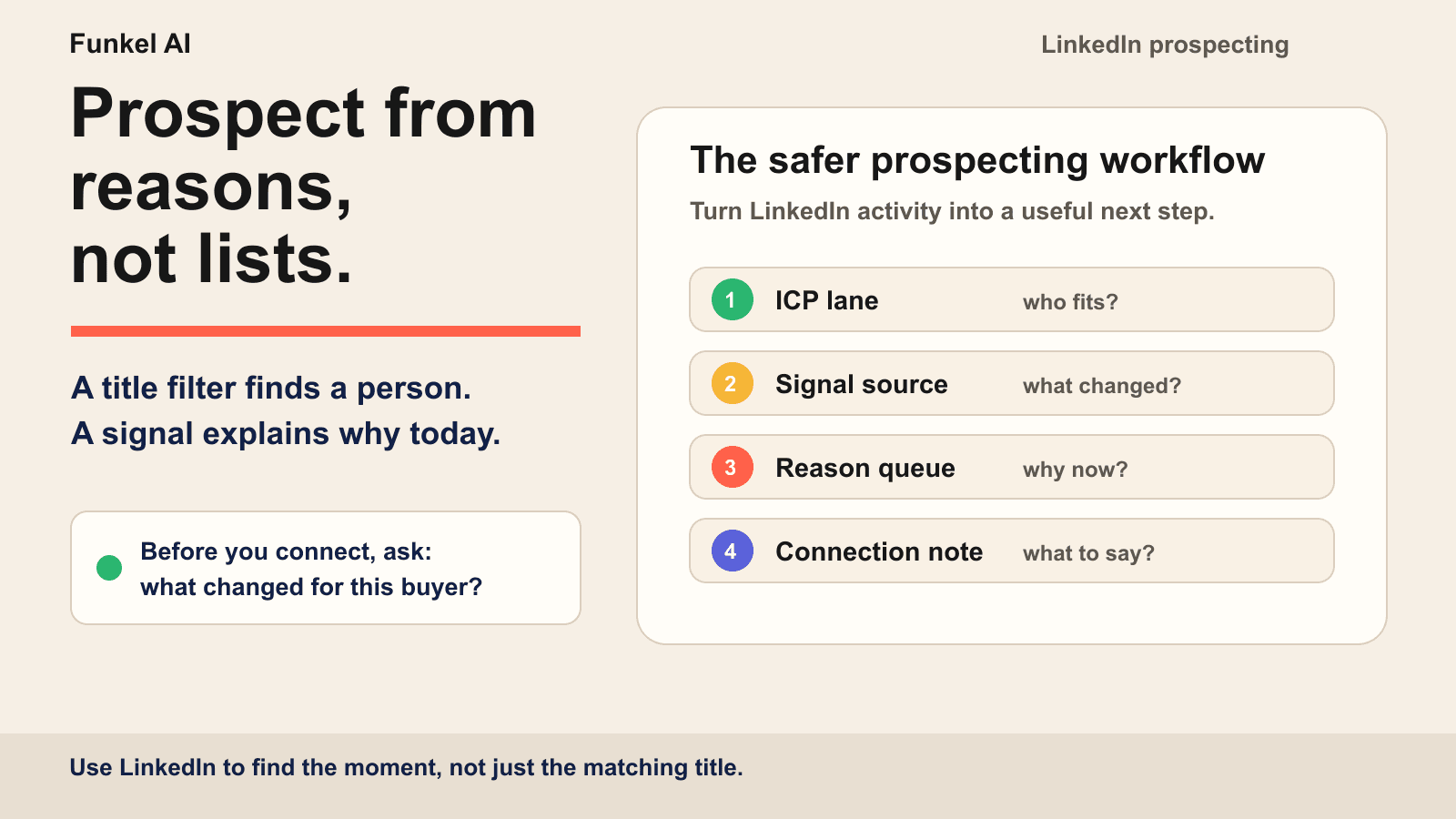
LinkedIn prospecting is the process of finding possible buyers on LinkedIn, qualifying their fit, and using current evidence to decide whether to skip, watch, connect, or message. A useful workflow keeps the observed fact separate from your inference and carries the same context into follow-up.
That creates a seven-step loop: sharpen the profile buyers will inspect, define one narrow ICP, turn that ICP into filters, watch for timely evidence, choose the next action, write from the strongest reason, and carry that context into follow-up.
Before you run these steps, use the LinkedIn prospecting strategy for small B2B teams to set the buyer lane, test period, and review rules.
The mistake is treating LinkedIn like a prettier lead database. A list of job titles is not a prospecting system. A useful LinkedIn workflow answers four questions: who fits, what changed, why now, and what should the message say because of it?
What is LinkedIn prospecting?
LinkedIn prospecting turns a pool of possible buyers into a smaller set of people who fit, have useful context, and justify a specific next action. It sits between lead generation and outreach. LinkedIn defines sales prospecting as identifying and connecting with potential buyers, then qualifying them for a sales process in its current sales prospecting guide.
| Activity | Main question | Useful output |
|---|---|---|
| LinkedIn lead generation | Who could fit? | A candidate pool |
| LinkedIn prospecting | Who fits, and why act now? | A qualified reason and next action |
| LinkedIn outreach | How should we start the conversation? | A connection request, message, or helpful interaction |
| Stage | Question | Useful output |
|---|---|---|
| Fit | Who has the problem? | One narrow ICP |
| Evidence | What changed, and where is the source? | An observed fact with a date |
| Action | What does the evidence justify? | Skip, watch, connect, or message |
| Learning | Which reasons create useful conversations? | Outcomes by source and reason |
The decision after every LinkedIn search result
Search results are candidates, not a send queue. Give every profile one explicit disposition so a broad search cannot quietly become a broad campaign.
| Decision | Use it when | What happens next |
|---|---|---|
| Skip | The role, company, geography, or problem does not fit | Record the exclusion and remove the profile |
| Watch | The buyer fits, but there is no current reason to interrupt | Save the lead or source and wait for better evidence |
| Connect | There is relevant context, but no clear business request yet | Use a low-pressure note or engage only when you can add value |
| Message | A current, attributable reason makes a conversation useful now | Write from the evidence and ask one proportional question |
LinkedIn prospecting works best when it starts narrow
Start with one buyer profile, not a broad market. “B2B SaaS founders” is too wide. “Seed-stage B2B SaaS founders launching a new outbound motion with a small team” is a usable prospecting lane.
A tight buyer profile should include:
- Role: the person who feels the problem and can approve the next step.
- Company context: size, market, stage, region, and operating model.
- Pain: the workflow problem that would make them care.
- Trigger: the visible change that makes the conversation timely.
If you cannot name the pain and the trigger, you are not ready to send. You are still building a list.
Step 1: make the profile support the conversation
Most prospects will inspect your profile before they reply. Make that inspection useful. The headline should explain the problem you solve, the About section should show how you think about it, and the Featured section should give the buyer one credible place to learn more.
Do not turn the profile into a landing page full of unsupported claims. A clear point of view, a concrete explanation, and real examples create more trust than a wall of superlatives. If the message and the profile describe different value, the conversation starts with friction.
The free LinkedIn headline generator can help you turn a vague role label into a buyer-facing value statement before you start outreach.
Step 2: turn the ICP into search filters
Start with standard LinkedIn search. Enter a role, company, or location, select People, then use All Filters to narrow the pool. LinkedIn's people-search instructions list current company, location, industry, and keywords among the available filters. They mark some filters, such as Actively hiring, as Premium features. Use the filters available to your account.
For example, search for sales leaders at B2B software companies in one region. Open the first 20 consecutive profiles and record role fit, company fit, and any dated source that supports a next step. LinkedIn says result counts are approximate, so judge the actual profiles rather than the number above the search results.
LinkedIn also supports a conversational people-search query. Its help page says to leave quotation marks out of that query. Use Boolean search when you need exact keyword matching. Keep the first pass narrow, then change one filter after you review the sample.
Sales Navigator adds a different search layer for larger or repeatable lists. It provides lead and account filters, saved searches, and saved leads. Do not assume that every Sales Navigator filter exists in standard LinkedIn search.
LinkedIn's current Sales Navigator 101 guide says Advanced Lead Search uses more than 40 filters. It separates Personas, lead filters, account filters, saved searches, saved leads, alerts, Lead Pages, and Account Pages. That structure is useful even if you start with standard LinkedIn: define the buyer, narrow the account pool, inspect the person, then decide what the evidence supports.
The output of this step is not “send everyone a connection request.” The output is a clean pool of people worth checking for signals.
Step 3: look for signal sources, not just profiles
A profile tells you whether someone fits. Signal sources tell you whether there is a reason to talk now. This is where LinkedIn becomes more useful than a static database.
Start with five signal sources:
- Recent role changes: new leaders often review tools, process, and pipeline ownership.
- Hiring activity: new GTM roles usually mean new workload, handoffs, or reporting pressure.
- Competitor and tool posts: complaints, comparisons, and migration questions often reveal live pain.
- Category engagement: likes and comments on relevant creator or competitor posts show attention, even when they are not buying yet.
- Your own warm moments: profile views, company post engagement, replies, and repeat visits deserve faster routing.
We keep a deeper breakdown in the LinkedIn intent signals field guide. The short version: do not treat every signal as equal. Some signals mean curiosity. Some mean pressure. A few create a real reason to write today.
Step 4: separate observed facts from assumptions
A useful prospect record has two different fields: what you can verify and what you think it might mean. Combining them creates creepy or inaccurate outreach. Keeping them separate gives another operator a chance to check your reasoning before a message goes out.
| Evidence-card field | Example | Guardrail |
|---|---|---|
| Observed fact | The company posted two SDR roles on July 27 | Keep the source URL and date |
| Buyer fit | The sales leader owns early outbound at a seed-stage SaaS company | Verify the current role and company |
| Business hypothesis | The team may be formalizing its outbound process | Label this as an inference, not a fact |
| Proportional action | Connect with one question about list quality or message context | Do not claim the company has a pipeline problem |
The free buyer-intent signal prioritizer helps you compare evidence quality, freshness, ownership, and the safest next action before a signal enters outreach.
Step 5: build a reason queue
A reason queue ranks prospects by the current reason to contact them, not just by how well they match your ICP. This is the part most teams skip.
Create a simple queue with these fields:
- prospect and company
- source URL or note
- signal type
- date seen
- freshness window
- likely business pressure
- message angle
- next owner and next action
This turns LinkedIn prospecting from “who can we scrape?” into “who has a current reason to hear from us?” It also protects quality. If the signal does not change the message, it should not create an outreach task.
Copy this 20-profile LinkedIn prospecting audit
Audit 20 consecutive profiles from one search before you expand the list or start outreach. Do not select only the strongest profiles. The sample should show what the search returns in normal use.
Copy this row template into a document or spreadsheet. Duplicate it until you have rows 1 through 20:
Row [1–20] — Profile URL: ___ | Company: ___ | Role fit: yes/no | Account fit: yes/no | Current evidence: yes/no | Source URL: ___ | Date seen: ___ | Observed fact: ___ | Labelled hypothesis: ___ | Route: skip/watch/connect/message | Reason: ___
| Audit check | How to calculate it | What it tells you |
|---|---|---|
| Role-fit count | Profiles with role fit marked yes, out of 20 | Whether titles and seniority find the correct owner |
| Account-fit count | Profiles with account fit marked yes, out of 20 | Whether company filters match the prospecting lane |
| Evidence coverage | Profiles with a source, date, and observed fact, out of 20 | Whether the list contains a verifiable reason to act |
| Route count | Total profiles in skip, watch, connect, and message | Whether search results became explicit decisions |
| Repeated mismatch | Count each recurring exclusion reason | Which single filter or exclusion to change next |
If the same mismatch appears three times, change one filter and audit a fresh set of 20 profiles. Keep a matching profile in watch when its evidence lacks a source or date. This audit tests qualification quality. It does not predict acceptance, replies, or meetings.
Worked example: turn the audit into one search change
This is an illustrative example, not a result from a real campaign. A founder reviews 20 consecutive profiles for one B2B software buyer lane. Twelve people have the target role, but only nine also work at a matching company. Four profiles have a dated source and an observed fact that could support a conversation.
| Audit result | What the founder learns | Next action |
|---|---|---|
| Five profiles belong to agencies outside the buyer lane | The account search is too broad | Narrow the company search, then audit 20 new profiles |
| Five matching people lack a dated reason to act | Fit alone does not make outreach timely | Keep them in watch and check a relevant signal source later |
| Four profiles have a source, date, and observed fact | These records can receive a route decision | Review the fact and choose connect or message individually |
Change the company search first because that mismatch repeats most. Keep the buyer profile and review rules fixed for the next 20 profiles. Compare role fit, account fit, and evidence coverage across both batches. Do not call a better search a better campaign until real conversations support that conclusion.
What should LinkedIn prospecting automation do?
LinkedIn prospecting automation should reduce repeatable research, record, and routing work. It should not invent a reason, bypass platform controls, or treat every search result as a send task. A practical system keeps the source, labels inference, proposes a next action, requires review for early batches, and stops after a reply.
Use AI where the work has a clear input and a checkable output. Keep a person responsible where identity, interpretation, account risk, or a real conversation changes the decision.
| Prospecting task | AI can help with | A person still owns |
|---|---|---|
| Candidate research | Summarize public profile and company details | Verify identity, role, company, and current fit |
| Signal capture | Keep the source URL, observed fact, and date together | Separate the verified fact from the business hypothesis |
| Queue routing | Suggest skip, watch, connect, or message | Approve early batches and resolve uncertain cases |
| Message drafting | Draft from approved evidence and one proportional question | Remove unsupported claims and review tone |
| Follow-up and stopping | Carry context forward and record a reply | Handle sensitive replies and confirm that later actions stop |
LinkedIn's current User Agreement prohibits bots and other unauthorized automated methods for accessing the service, adding contacts, or sending messages. A tool does not make an action compliant. Review the current agreement and keep the workflow inside the access and sending methods LinkedIn permits.
Step 6: write the connection note from the signal
The connection note should do one job: make the reason obvious enough that accepting feels natural. It does not need to sell the product. It needs to prove you are not spraying the same opener at everyone.
Use this pattern:
- Name the observed signal.
- Connect it to a likely problem or pressure.
- Ask a small, relevant question.
For example:
Role change: “Saw you just stepped into growth at a seed-stage SaaS team. Are you already rebuilding the outbound motion, or still diagnosing where pipeline comes from?”
Hiring signal: “Noticed the SDR hiring push. Curious whether the bigger bottleneck is list quality or getting context into the first message.”
Tool complaint: “Saw your note about manual cleanup after enrichment. Is the painful part bad data, or the handoff from signal to message?”
The full craft is in connection notes that get accepted. The important rule is simple: write the note from the reason, not from the template.
Step 7: follow up with context, not pressure
The first follow-up should carry the original reason forward. If the prospect accepted because of a hiring signal, the follow-up should not suddenly become a generic demo pitch. Keep the thread tied to the same business pressure.
A clean follow-up has three parts:
- Context: why you reached out in the first place.
- Observation: what usually breaks when that context appears.
- Low-friction next step: a question, checklist, or useful comparison.
This is where AI drafting can help, but only if the input is specific. An AI agent with just a name and title writes generic outreach faster. An agent with fit, signal, freshness, and a pain hypothesis can draft a useful first pass. We explain the decision boundary in when to use AI-personalized vs manual messages.
Protect the account while you learn
Good LinkedIn prospecting is paced. Sending more does not help if it burns trust with buyers or pushes the account into warning territory. Start with low daily volume, review early drafts, and increase only when the replies justify it.
The safest early workflow is:
- Pick one buyer lane.
- Run two signal sources.
- Review the first 20 connection notes manually.
- Track accepts and replies by signal source.
- Pause the signal that creates weak conversations.
This is also why pacing is built into Funkel AI. The goal is not to maximize daily sends. The goal is to keep account behavior reasonable while you learn which buyer moments are actually producing conversations. The deeper safety logic is in how we keep your LinkedIn account safe.
LinkedIn search or Sales Navigator?
Standard LinkedIn is enough to learn the workflow. Sales Navigator becomes useful when better filters and saved searches reduce manual work. LinkedIn's own Sales Navigator search guide explains how its lead and account filters work.
| Use standard LinkedIn when | Use Sales Navigator when |
|---|---|
| You are testing one narrow ICP | You need richer lead and account filters |
| You can review prospects manually | You need saved searches and repeatable lists |
| You are still learning which signals matter | Your signal workflow already produces useful replies |
If you are ready for the paid product, use our Sales Navigator prospecting guide to build the search without mistaking every result for a qualified lead.
A simple LinkedIn prospecting workflow
Here is the complete workflow in one pass:
- Define one ICP and one pain point.
- Use LinkedIn filters to create a clean prospect pool.
- Watch two or three signal sources for recent changes.
- Rank prospects by reason quality and freshness.
- Write the connection note from the signal.
- Follow up with the same context, not a generic pitch.
- Measure accepts, replies, and meetings by signal source.
That is the shift from list building to prospecting. Lists tell you who could buy. Signals tell you who might care now. The message has to connect the two.
A 30-minute daily LinkedIn prospecting cadence
A small team does not need an all-day research ritual. One focused half-hour can keep the queue current while preserving time for real conversations:
- Five minutes: review saved searches and remove obvious mismatches.
- Ten minutes: inspect recent role changes, hiring, posts, comments, and tool discussions.
- Ten minutes: write or approve the best few notes from the strongest reasons.
- Five minutes: route replies, record the source, and stop any signal that keeps producing weak conversations.
The point of the cadence is not a send quota. It is a freshness deadline. A small reason queue reviewed every day is more useful than a large list that nobody trusts.
Common mistakes
Prospecting from titles only
Titles are fit data. They do not tell you whether the buyer has a current reason to care. Use titles to narrow the pool, then use signals to decide who deserves attention.
Confusing engagement with intent
A like on a popular post can be useful, but it is not the same as a buyer asking for alternatives or complaining about a tool. Treat weak signals as context for nurture, not a reason for a hard pitch.
Letting every signal create the same message
A role change, hiring spike, tool complaint, and profile view should not produce the same opener. If they do, the campaign is not personalized. It is segmented.
FAQ
How do you use LinkedIn for sales prospecting?
Use LinkedIn to define a focused buyer pool, monitor signals such as role changes, hiring, tool complaints, and warm engagement, then rank prospects by the freshness and quality of the reason to reach out. The message should change based on the signal.
How do you prospect on LinkedIn without being spammy?
Keep the buyer profile narrow, send fewer connection requests, reference a real signal, avoid an immediate product pitch, and follow up with the same context. Review early drafts manually before increasing volume.
Do you need Sales Navigator for LinkedIn prospecting?
No. Start with standard LinkedIn people search and the filters available to your account. Audit 20 profiles for fit and current evidence. Sales Navigator becomes useful when you need richer filters, saved searches, lead lists, and a repeatable process across more accounts.
Is LinkedIn good for B2B sales prospecting?
Yes, when you use it as a research and relationship channel rather than a bulk-send list. LinkedIn can help you identify likely buyers, inspect their work and company context, notice public changes, and choose a proportional next action.
What should you record before contacting a LinkedIn prospect?
Record who the buyer is, the source URL, the observed fact, when it happened, your clearly labelled business hypothesis, and the next action. Keeping observation separate from inference makes the outreach easier to verify and less likely to overclaim.
What is the difference between LinkedIn lead generation, prospecting, and outreach?
LinkedIn lead generation finds possible buyers. LinkedIn prospecting qualifies their fit, context, and reason for contact. LinkedIn outreach starts the conversation through a connection request, message, comment, or another appropriate channel.
How do you audit a LinkedIn prospect list?
Review 20 consecutive profiles from one search. Record role fit, account fit, current evidence, source, date, route, and reason for every profile. Count repeated mismatches, then adjust one filter and audit a fresh set before increasing volume.
How can AI help with LinkedIn prospecting?
AI can summarize public research, preserve source details, suggest a next action, and draft from approved evidence. A person should verify identity and fit, keep facts separate from inference, review early batches, handle sensitive replies, and stop any workflow that conflicts with LinkedIn rules.
Read next
- Outbound sales automation tools in 2026: 6 compared by intent signalsCompare six outbound sales automation tools by intent evidence, route control, CRM handoff, cross-channel stops, and complete cost.
- How to use LinkedIn Sales Navigator for prospecting: 7 stepsUse a seven-step Sales Navigator workflow, audit 20 leads, fix poor search results, and separate saved searches from lead alerts and outreach routes.
- Best B2B intent data providers: 9 options compared for 2026Compare nine B2B intent data providers by signal grain and evidence. Use a 25-account scorecard to test a shortlist.